How to File a DMCA Takedown on Shopify (Step-by-Step Guide)

Jesse Xu
CTO
Guides
Shopify has empowered countless entrepreneurs to build online stores easily. Unfortunately, that same ease of use also makes it simple for bad actors to create counterfeit or copycat stores. If you’re a brand owner or seller, you may have stumbled upon a Shopify store that looks suspiciously like yours – using your product photos, descriptions, or even your brand name without permission. These knock-off stores aren’t just annoying; they can confuse customers, steal sales, and damage your brand’s reputation. In this guide, we’ll walk you through why this problem exists and how to fight back using a DMCA takedown on Shopify. The tone here is conversational and approachable, so whether you’re a small business owner or a legal professional, you’ll find clear steps to protect your hard work.
Why Shopify Has an IP Problem
Shopify’s success is a double-edged sword for intellectual property (IP) protection. On one hand, over a million legitimate merchants use Shopify to reach customers. On the other hand, scammers and counterfeiters have flooded the platform with fake stores. In fact, recent analyses suggest that roughly 1 in 5 Shopify sellers could be engaging in fraudulent or deceptive practices, from selling counterfeit goods to failing to deliver products at all. This means tens of thousands of questionable stores may be operating at any given time.
Why is this happening? Simply put, it’s very easy to set up a Shopify store. Scammers can launch a store in minutes, often copying a popular brand’s images and text to make their site look authentic. They lure shoppers with deals or ads, then either ship low-quality knockoffs or nothing at all. These fake Shopify sites often use stolen product photos, copied descriptions, and even your trademarks (like brand names and logos) to trick people into thinking they’re buying from the real brand. For honest business owners, it’s frustrating to see your creative content and hard-earned reputation hijacked in this way.
Shopify does have policies against IP infringement and fraud. They use tools to detect obvious scams and will remove infringing content if it’s reported. The catch is that Shopify usually doesn’t know something on a store is counterfeit until someone reports it. That’s why the burden often falls on brand owners to be proactive. The good news: there’s a formal process to get these copycat listings or stores taken down – and it starts with understanding the DMCA.
What Is a DMCA Takedown?
DMCA stands for Digital Millennium Copyright Act, a U.S. law enacted in 1998 to help copyright owners protect their work online. In simple terms, a DMCA takedown notice is a formal request you send to a website or platform (like Shopify) to remove content that infringes your copyright. It’s basically a tool to say, “Hey, that content is mine and they’re using it without permission – please take it down.”
Think of it this way: if someone copied your product photos, descriptions, blog posts, or any original content and posted it on their Shopify store, that’s copyright infringement. A DMCA takedown is the mechanism to get that stolen content removed from their site. When the platform (Shopify in this case) receives a valid DMCA notice from you (the rightful owner), they are obligated to take down the infringing material (to maintain their own legal safe harbor).
When should you use a DMCA? Use it when you find unauthorized copies of your creative content on a Shopify store. Common situations include: another store using your exact product images, copying large sections of text from your site, or embedding your videos. These are clear copyright violations.
It’s worth noting that trademark infringement (like misuse of your brand name or logo) is a slightly different legal issue than copyright, and technically not covered by the DMCA law. However, Shopify’s reporting system allows you to report trademark or trade dress infringement as well through a similar process. So if a Shopify store is using your trademarked name, logo, or packaging, you can report that, too (just choose the “trademark infringement” option instead of copyright in the form). In short, for copycats and counterfeiters on Shopify, you have recourse: file a complaint and get their content taken down, whether it’s through a DMCA (for copyright) or a trademark infringement report. Next, we’ll dive into the step-by-step process.
How to File a DMCA Takedown on Shopify (Step-by-Step)
Filing a DMCA takedown on Shopify might sound intimidating, but it’s actually a straightforward process you can do yourself. Here’s a step-by-step guide:
Identify the infringing Shopify store and content. First, make sure the offending website is indeed a Shopify store. (Tip: Shopify stores often have a
.myshopify.comin their URL if they’re using a Shopify subdomain, but many use custom domains. Clues like the checkout page format or site design can hint it’s Shopify-powered.) Once confirmed, pinpoint exactly what content they stole from you. Is it a specific product page with your photos and copy? Is it an entire collection of your designs? Note the URLs of the specific pages where your content appears, and take screenshots if possible. The more specific you are about what’s infringing, the better.Gather evidence of your ownership. To strengthen your case, assemble proof that you own the original content. This could be links to your own website or store where the images or text originally appear, records of your copyright (if registered), or any other documentation. While Shopify’s form will ask for links to your original work, having screenshots and dates (like when you first published that content) is also helpful for your own records. Essentially, you want to show: “Here’s my original material, and here’s the copy on the infringing Shopify site.”
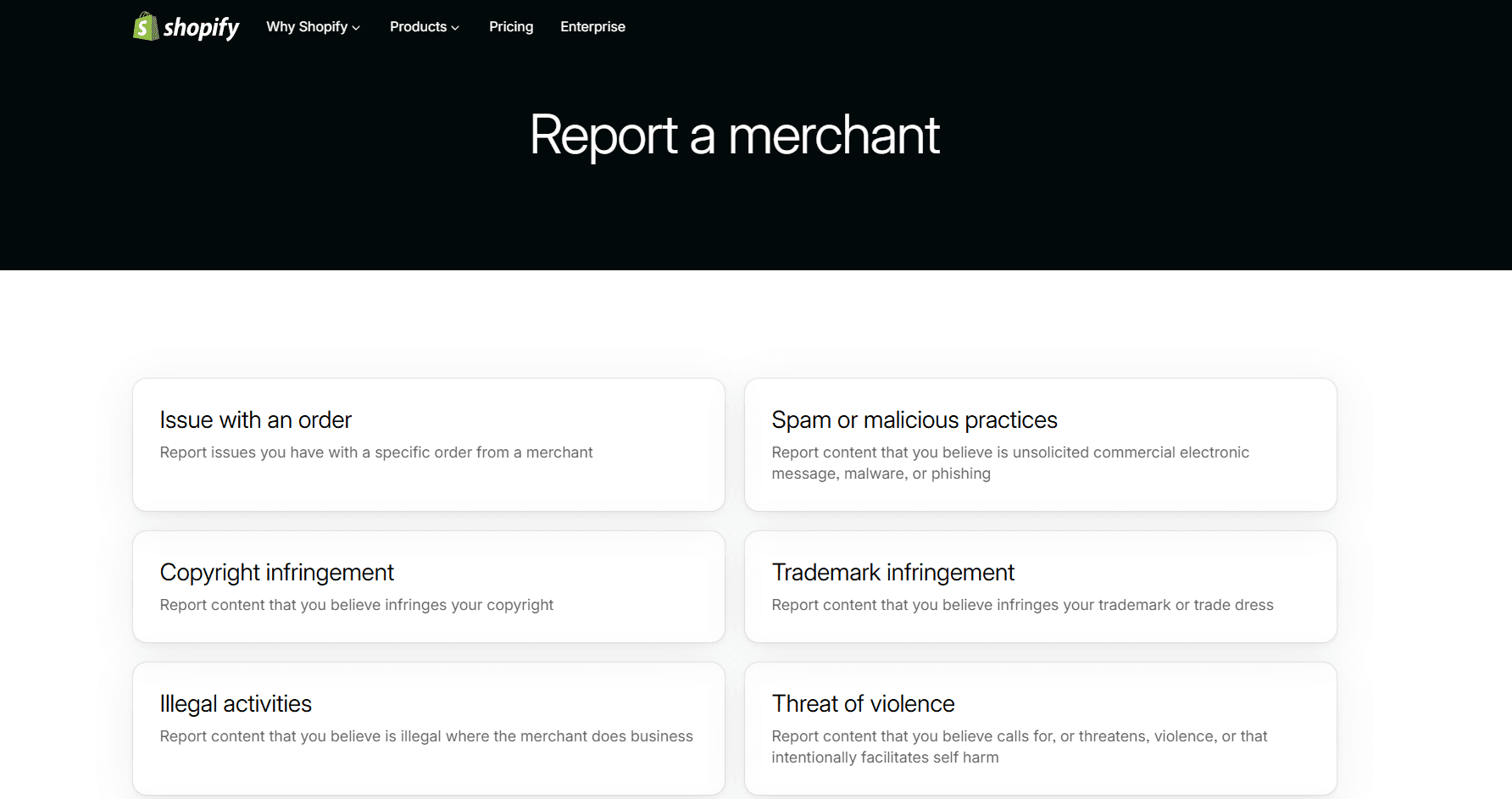
Access Shopify’s official report form. Shopify has an online “Report a merchant” portal for IP issues. To use it, you’ll need to log in with a Shopify account. (If you don’t have one, you can create a free Shopify account just to submit your complaint – you don’t need to run a store yourself.) Once logged in, go to the “Report a merchant” page and select the option for “Copyright infringement”. (If it’s a trademark issue, select “Trademark infringement” instead.) This will bring up Shopify’s DMCA takedown notice form.
Fill out the DMCA takedown notice form. The form will ask for all the details required by law to process a copyright claim. Be prepared to provide:
Your contact information – Your full legal name, company (if applicable), mailing address, phone, and email. (Shopify may share this with the store owner as part of the legal process, so be aware you’re not anonymous.)
Identification of your work – Provide a link to your original content (or a detailed description if a link isn’t available). For example, link to your product page or your image gallery that shows the original photo.
Identification of the infringing material on Shopify – List the exact URLs on the Shopify store where the infringing content is located. Don’t just give the main homepage; list each product page or image URL that contains your content. The form usually has space to add multiple URLs.
Description of the infringement – Explain what is being infringed and how. For instance, “They copied the product description and all images from our website” or “The image on their page is our photograph, which we own the copyright to.”
A declaration of good faith – You will need to affirm that you have a “good faith belief” that the use of the material is not authorized by you (the owner), your agent, or by law. This is basically saying you truly believe this is an infringement and not some allowed use.
Accuracy and authority statement – You must state that the information you’re providing is accurate, and that you are the copyright owner or are authorized to act on the owner’s behalf (for example, you’re an agent or attorney for the owner).
Signature – You must sign the notice. Typing your full name usually suffices as an electronic signature in the online form.
Fill in all these details carefully. Write clearly and stick to the facts. For example, instead of venting “They stole my stuff!”, you might write: “I am the owner of the copyrighted images and text on www.mybrand.com/product123 (original product page). The Shopify store at fake-shop-example.com has used my images and text on their product page without permission (see infringing URLs listed).” Clarity helps Shopify’s team understand the issue quickly.
Submit the form and record it. Once you’ve double-checked everything, hit Submit. Shopify will display a confirmation that your notice has been received. It’s a good idea to save a copy of your submission (you might take a screenshot of the confirmation or note down the date and time). Shopify may also send a confirmation email to you. Keep this for your records.
Follow up and monitor the outcome. After submission, Shopify’s Trust & Safety or legal team will review your complaint. In many cases, you’ll hear back via email relatively quickly (it could be a few days, sometimes even within 24-48 hours). If your notice is complete and valid, Shopify will generally take down the infringing content or even disable the offender’s store, and notify the store owner about the removal. You may get an email saying the content was removed or the shop was taken down due to your report. If a week or more goes by with no response, you might consider reaching out to Shopify’s legal department at their designated email (legal@shopify.com) to check on the status, referencing your original report.
In some situations, the store owner might respond with a counter-notice (essentially disputing your claim, which is their right under the DMCA). If that happens, Shopify will let you know. A counter-notice means the accused party is claiming they actually have rights to the content or that it was a mistake. Don’t panic – counter-notices are relatively rare in blatant counterfeit cases. But if it does occur, Shopify will generally restore the content after 10–14 business days unless you take further legal action (like filing a lawsuit to prove infringement). This is a bit more advanced and usually involves legal counsel. The short version: most copycats won’t bother countering a legitimate takedown notice, but be aware of the possibility.Repeat or escalate if necessary. Hopefully, one DMCA notice is all it takes to get the offending content removed. If Shopify for some reason denies your request (maybe something was missing in your notice or they didn’t find the evidence sufficient), you can gather more evidence and submit a new notice. Make sure your copyrights are clearly established (e.g. if you haven’t already, consider registering important works with the copyright office, and register trademarks with the USPTO – it adds weight to your claims). If the problem persists or there are multiple copycat sites popping up, you might need to take a broader strategy – which we’ll touch on in a moment in our tips and in the closing section.
By following these steps, you leverage the legal framework that forces Shopify to remove content violating your rights. It’s empowering to know that you’re not helpless – you have a process to shut down the bad guys (at least on Shopify). Next, let’s go over some tips to improve your success rate with these takedowns.
Tips to Improve Your Success Rate
Filing the notice is one thing; making sure it’s effective is another. Here are some practical tips to help your DMCA takedown request succeed quickly:
Be thorough and precise in your report. The more complete and clear your takedown notice, the faster Shopify can act. Provide all the information requested in the form. Double-check that the URLs you listed for infringing material are correct and active. If you list the wrong link or something vague like just the homepage, it may delay the process. It helps to add brief notes like “(image at top of page)” or “(description under product title)” to point Shopify to the exact element that’s copied.
Provide evidence of originality. While the form might not require you to upload files, you can strengthen your case by referencing your original work clearly. For example: “Original image is on our site here [link] and attached is a screenshot of our page from last year.” If Shopify’s team can easily see side-by-side that the other store copied you, they’ll be confident in taking action. If you have official IP rights (registered copyright or trademark), mention that in your description as well (“Our logo is a registered trademark, Reg. No. 1234567”).
Act quickly when you discover an infringement. The longer a counterfeit or copycat store stays up, the more damage it can do – and the more sales or customers you might lose. Don’t put off filing a complaint. Prompt action not only protects your brand sooner but also shows Shopify that you are vigilant. Early reporting might also catch the fraudulent seller before they potentially move or hide assets.
Maintain a professional tone. It’s understandable to feel angry or violated when someone steals your work. However, in your DMCA notice (and any communication with Shopify), stick to a calm, factual tone. Avoid profanity or personal attacks against the infringer. A concise, professional report will be taken seriously. Remember, the person reviewing your claim is a Shopify legal agent or staffer – you want to make their job easier by clearly showing the violation.
Know the limits (and when to get help). A DMCA takedown will remove the content from Shopify’s platform, but it doesn’t automatically punish the infringer beyond that. Sometimes, a counterfeit seller might pop up again under a new store name. Also, DMCA is primarily for copyright issues; if your issue is mainly patent-related or a design that’s been copied (and not just the content), Shopify might not resolve that without a court order. If you find yourself dealing with a repeat offender or a complex situation, consider consulting a legal professional or using a brand protection service (more on that next).
Implementing these tips can significantly boost the chance that your takedown request is accepted on the first try and handled swiftly. Now, let’s wrap up with some thoughts on staying proactive and how Podqi can assist in this ongoing battle.
Protect Your Brand Proactively
Filing a DMCA takedown on Shopify is a powerful way to shut down a copycat store that’s ripping off your brand – but it’s often just one part of a larger strategy. Counterfeit and infringing sites are a growing problem, and for every one you take down, another might appear next month. The key is to be proactive in protecting your brand. This means regularly monitoring e-commerce platforms (Shopify and beyond) for any unauthorized use of your content or trademarks, and acting quickly when you find something.
Manually policing the internet for infringements can feel like a never-ending game of whack-a-mole. That’s where automated solutions come into play. Podqi offers monitoring and enforcement support to help brand owners and sellers stay ahead of scammers. Podqi’s platform uses advanced AI to scan thousands of online marketplaces and stores (including Shopify) for potential infringements of your products, images, and brand identity. When a fake or unauthorized listing is detected, Podqi can help you take it down with minimal effort – often with one-click automated takedown notices across multiple sites.
In other words, Podqi works like your dedicated digital watchdog, catching copycats and counterfeit listings even before you’re aware of them. Instead of reacting only when you stumble across a fake Shopify store, Podqi’s continuous monitoring means you get alerts as soon as something suspicious appears. Then, with Podqi’s enforcement tools, those infringing listings can be removed swiftly, saving you time and legal headaches. It’s like having a personal brand protection team on autopilot.
Call to Action: Don’t wait until a copycat hurts your business. Be proactive in defending your brand’s hard-earned reputation. If you need help or want to learn more about simplifying IP protection, reach out to Podqi. Whether you’re an ecommerce entrepreneur or a legal professional managing a brand’s portfolio, Podqi can amplify your efforts with AI-driven monitoring and one-click takedowns. Your brand deserves vigilant protection – and with the right tools and knowledge (now you have both, after reading this guide!), you can keep the scammers at bay and focus on what you do best: growing your business.
FAQ
Q: Do I need a Shopify account to file a DMCA takedown notice?
A: Yes. Shopify’s online infringement report form requires you to log in. If you already have a Shopify account (as a merchant or even a customer), you can use that. If not, you can sign up for a free account just to submit your DMCA notice. Alternatively, if you absolutely cannot use the online form, Shopify allows email reports to their legal team, but using the official form is the fastest and most efficient route.
Q: How long does it take for Shopify to remove the content once I file a complaint?
A: It often happens pretty quickly. In many cases, Shopify will review and take action within a few days. If your submission is clear-cut and complete, we’ve seen takedowns happen in 24–48 hours. You’ll know it’s done when the infringing page or store disappears, or you get a confirmation from Shopify. If it’s been over a week with no response, you might follow up or double-check that your initial notice had all the required info.
Q: Will the owner of the offending Shopify store know that I reported them?
A: Generally, yes. When Shopify sends the DMCA takedown notice to the merchant, they include a copy of the complaint. Your name and contact details (provided in the notice) may be shared with the store owner as part of the legal process. This transparency is required by the DMCA’s rules. While it might feel uncomfortable to have your info disclosed, it’s meant to allow the other party a chance to respond (for instance, via a counter-notice). In practice, most counterfeiters will simply slink away once their store is taken down, but if you have safety concerns, you can consult a lawyer on how to proceed.
Q: What if the counterfeit seller files a counter-notice or refuses to comply?
A: Under the DMCA, the alleged infringer can file a counter-notice claiming they have rights to the content or that no infringement occurred. If they do this (and it meets legal requirements), Shopify may restore the content after about 10 business days unless you take further legal action. At that point, to keep the content down, you’d need to pursue a court case (e.g. a copyright infringement lawsuit). However, in the context of obvious counterfeits, it’s pretty rare for scammers to counter-notice – that would essentially put them on the legal radar, which they usually want to avoid. If someone outright refuses and the content stays up, you might need to escalate to legal action or enlist a brand protection service to apply more pressure. The good news is that most of the time, a properly filed takedown notice is enough to solve the issue on Shopify.
Q: Can I use this process for trademark issues, or only for copyrighted material?
A: You can use Shopify’s reporting form for trademark or trade dress infringements too. The DMCA law is strictly about copyrights (creative works like text, images, videos, etc.), but Shopify provides a similar mechanism to report trademark violations (like unauthorized use of your brand name, logo, slogans, or distinctive product packaging). In the “Report a merchant” portal, you would choose “Trademark infringement” instead of “Copyright infringement” and then fill out the details about your trademark and how it’s being misused. The overall process of review and takedown is similar. In short: for copied text or photos, select the copyright path; for misuse of your brand name/logo or counterfeit goods using your brand, select the trademark path. Both are important tools in protecting your IP on Shopify.